.png?width=200&height=59&name=IPTellogo-byline-2020-dark-v2-pnd-optimised-500%20(1).png "IPTellogo-byline-2020-dark-v2-pnd-optimised-500 (1)")
Outdoor Wi-Fi needs design just as much as indoor Wi-Fi, and trees are one of the most overlooked obstacles. In this blog, we'll look at the effect of trees on Wi-Fi, compare a predictive design with a real survey of the same area, and cover how to plan around foliage.
Outdoor Wi-Fi: Why Trees Get in the Way
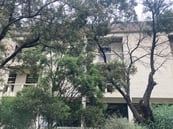 Trees sit between the access point (AP) and the people trying to use it. Wi-Fi relies on clean signal propagation, and leaves and branches absorb and scatter that signal. Many outdoor areas are surrounded by trees, and short of cutting them back, there's not a lot you can do about them.
What you can do is design for them. Where foliage could be an issue, call it out as a caveat in the survey report and on the design markup, so everyone knows the limits of the coverage before the APs go up.
If you're planning a point-to-point wireless link, the same problem applies. The first Fresnel zone (the football-shaped area around the direct line between the two antennas) needs to be kept clear of obstructions, including tree canopies. It's higher than you'd think, and trees keep growing.
Foliage Attenuation: What Trees Do to RF
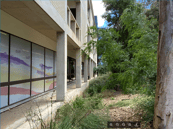 Foliage attenuates Wi-Fi because leaves contain a lot of water, and water is good at absorbing radio frequency (RF) energy. Signals still get through the gaps, but the coverage behind a tree is weaker and less predictable than open space, and it changes as the tree grows.
The side view here shows the site we surveyed. There's open space in front of the building, but the tree and its foliage cover a fair bit of it.
The Wi-Fi signal will propagate through the gaps. The catch is that you also have to allow for how the foliage will change over time, and the effect future growth will have on the signal.
Predictive Design: What the Model Showed
A predictive design shows the coverage you'd expect from an AP if nothing gets in the way. Unless you add an attenuation zone for the trees, the model treats foliage as open air, so coverage looks wide and even. That's a useful starting point, but it can paint a far rosier picture than the site delivers.
The image below shows the predictive design for this area. We're only looking at the highlighted AP in the middle; ignore the other AP on the left.
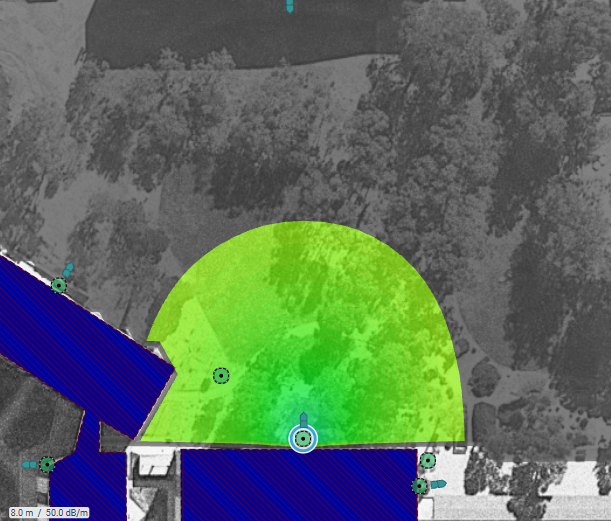
The coverage pattern is nice and wide. If you relied on this alone and didn't flag the trees to the customer, you'd be setting up a problem down the track.
Survey Results: What the Trees Actually Did
.gif?width=173&height=173&name=Wi-Fi%20Pre-Deployment%20Survey%20(Instagram).gif) The onsite survey told a different story. Coverage was good directly in front of the building and a little to the right, but poor on either side of the AP where the foliage sat. The pattern was no longer even in all directions, which is what you'd expect anywhere with heavy foliage.
The onsite survey told a different story. Coverage was good directly in front of the building and a little to the right, but poor on either side of the AP where the foliage sat. The pattern was no longer even in all directions, which is what you'd expect anywhere with heavy foliage.
The image below shows the actual survey results for the same AP.
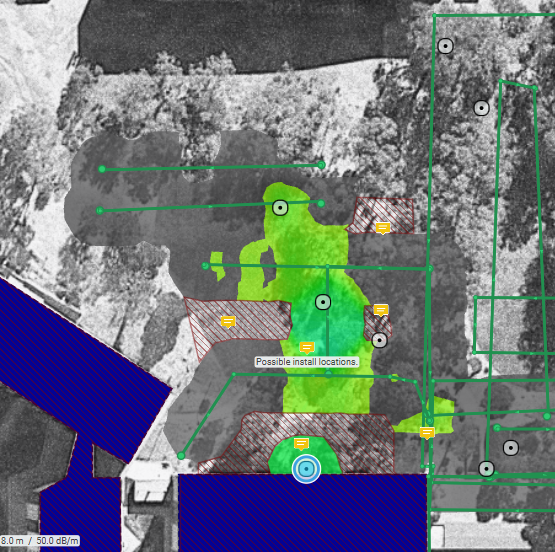
That gap between the model and the measurement is exactly why an onsite survey matters for outdoor areas.
Pro-Tip: Not all trees are evergreen. Survey in winter when the branches are bare and everything can look fine, then a few months later the leaves are back and so is the problem. Keep an eye on how the environment could change over the seasons.
Design Options: How to Plan Around Foliage
There's no perfect fix for trees, and cutting them down is rarely an option. You can place APs in different locations so signals reach around the foliage, or mount them higher for top-down coverage. Sometimes you have to accept that parts of an outdoor area will be best-effort coverage.
Whatever the approach, set expectations early. Survey with the leaves on where you can, model the trees as attenuation zones in the predictive design, and record the caveat in the design so the customer knows what to expect.
How Many Access Points Do You Need?
Planning outdoor or campus Wi-Fi? Start with a rough access point count. Our free Wi-Fi Access Point Calculator gives you a quick estimate for your building: enter each floor’s area and how many people use it, and it works out the access points, PoE budget and switch ports you’ll need, then emails you a full report.
Effect of Trees on Wi-Fi: FAQs
What Is the Effect of Trees on Wi-Fi?
Trees attenuate Wi-Fi signals because leaves hold a lot of water, which absorbs RF energy. Coverage behind foliage is weaker and patchier than in open space, and it changes with the seasons and as trees grow, so outdoor designs need to allow for it.
Why Doesn't a Predictive Design Show the Effect of Trees?
A predictive model only accounts for the obstacles you add to it. If the trees aren't modelled as attenuation zones, the software treats them as open air and shows wide, even coverage. An onsite survey shows what the foliage really does.
When Should I Survey an Outdoor Area With Trees?
Ideally when the trees are in full leaf, as that's the worst case. If you have to survey when deciduous trees are bare, allow for extra attenuation once the leaves return, and note the caveat in the report.
Do Trees Affect Point-to-Point Wireless Links?
Yes. A point-to-point link needs its first Fresnel zone kept clear, not just a clear line of sight. Tree canopies growing into that zone can degrade the link over time, so plan antenna heights with future growth in mind.
Effect of Trees on Wi-Fi: Summary
When you design outdoor Wi-Fi, every obstruction counts, and trees are the one most often missed, especially in autumn and winter when they've dropped their leaves. A predictive design gives you the starting point, an onsite survey shows the real effect of the foliage, and clear caveats in the design keep everyone's expectations realistic.
Need Help With Outdoor Wi-Fi Design?
Our Wi-Fi survey and design team can model your outdoor areas, survey them onsite and tell you where APs will work around the trees. If a design review would be useful, get in touch with the IPTel team or email sales@iptel.com.au.