.png?width=200&height=59&name=IPTellogo-byline-2020-dark-v2-pnd-optimised-500%20(1).png "IPTellogo-byline-2020-dark-v2-pnd-optimised-500 (1)")
Warehouses have very special requirements when it comes to providing Wi-Fi coverage, for a whole host of reasons.
They are a challenging environment in RF terms - there are often high ceilings, lots and lots of metal racking, RF attenuation is constantly changing (shelves filling and emptying, forklifts moving loads around and so on) and small devices which need good coverage.

Warehouses are unique environments for the deployment of Wi-Fi and need a specific design to work properly. Warehouses are increasingly using Wi-Fi devices, particularly bar code scanners, with newer warehouses deploying robots for the picking operation.
For a bit of background have a read on the Top 8 Secrets to Great Wi-Fi.
Warehouse Wi-Fi Devices
The devices themselves are varied, but are used to provide high efficiency for staff in their work.
From devices which provide an audio stream voice-pick service (to detail what should be collected from the shelves), to the workhorse barcode scanner (eg Zebra scanners), there's an array of devices in use.
Some use 2.4GHz, some use 5GHz and some may have small antennas or old chipsets. Devices are often used in real time in the warehouse environment, with staff receiving details of the items to pick over the Wi-Fi network and using scanners to record as the items are selected.
The Wi-Fi based barcode scanner is very popular now and increasingly they are combining the use of voice on the same end device. Voice is always a tricky Wi-Fi service to get operational, so Warehouse Wi-Fi has evolved to cope.
Warehouse Wi-Fi: Lessons Learnt
It's an environment that’s difficult to get right. So, there are a number of best practices and lessons learnt to take into account:
- Firstly, figure out the weakest transmitting device:
- That’s the benchmark and none of your APs should be running at a power higher than that
- That’s the benchmark and none of your APs should be running at a power higher than that
- A mix of directional and omni-directional APs is needed:
- One size does not fit all in a warehouse and it needs a mix of directional antennas to reach down aisles and omnis for open areas
- One size does not fit all in a warehouse and it needs a mix of directional antennas to reach down aisles and omnis for open areas
- A predictive survey is a must of course:
- If you don’t design it properly, it's not going to work
- If you don’t design it properly, it's not going to work
- The AP height is important:
- It’s a compromise between providing a wider arc of coverage the higher you deploy the AP and reducing the received power
- It’s a compromise between providing a wider arc of coverage the higher you deploy the AP and reducing the received power
- The antenna types are important:
- While some APs will be the internal antenna type, for some spots, external antennas will be required – size, gain, height and angle are all important
Guidelines for Warehouse Wi-Fi Design
The access point type, placement, angle, power and channel are all critical. Warehouses are tricky places to support high quality Wi-Fi, with so much metal in use.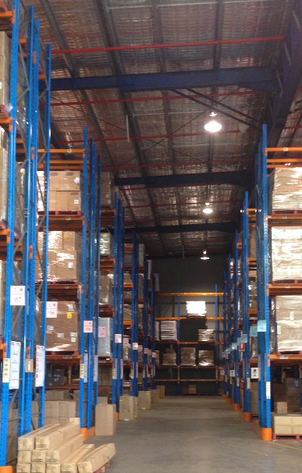
With many APs in a changing environment, it makes most sense to use the built in tuning features of the WLAN network - RRM and DCA.
The trick is to ensure that both settings are properly configured, based on the device types in use (i.e. don't use channels your clients can't use and set the max transmit power to match your weakest client).
Final word should go to surveys. As with every WLAN install, a Wi-Fi Predictive Design, Wi-Fi Pre-deployment Survey and Post Deployment Survey are critical elements.
You have to design, measure, adjust and improve the design. It's an iterative process, but one that can be used to achieve reliable Wi-Fi in a difficult environment.
Of course, following the guidelines doesn't mean it will all work without a hitch. Devices with old chipsets are in use, so watch out for these.
Overall, you can get a highly reliable Wi-Fi network working in a warehouse - it just takes time to design and deploy correctly.
Warehouse Wi-Fi Brackets
Illustrated below is an option for mounting an AP and using a down tilt to cover an area. We custom build these for warehouse customers:

Correct downtilt is quite important in the warehouse, as the ceilings are typically high and the aisles very long.
How Many Access Points Do You Need?
Planning Wi-Fi for a warehouse or distribution centre? Our free Wi-Fi Access Point Calculator gives you a quick estimate for your building: enter each floor’s area and how many people use it, and it works out the access points, PoE budget and switch ports you’ll need, then emails you a full report.
Choosing the Access Point and Antenna
Selecting the appropriate equipment is vital for a successful warehouse Wi-Fi deployment. The chosen equipment should be able to handle the unique challenges presented by a warehouse environment.
.png?width=220&height=220&name=Warehouse%20Wi-Fi%20Best%20Practice%20(Instagram).png)
The access point variant is the first decision - this can be an internal antenna variant or an external antenna variant. Both are typically used in the warehouse environment.
When using external antennas, the gain of the antenna is important and we normally fabricate a bracket, which allows a down tilt, so we can accurately position the AP for the required in-aisle coverage.
In terms of the AP and antenna combination, it is important to consider range, capacity, and reliability.
As your warehouse grows or changes layout, you may need to expand or reposition access points. Ensure that the equipment you choose can easily accommodate these changes without compromising the Wi-Fi experience.
Security: Protecting Warehouse Wi-Fi
Securing your warehouse Wi-Fi network is essential to protect sensitive data and prevent unauthorised .png?width=220&height=220&name=Networking%20Security%20Basics.%20(Instagram).png) access. Start by implementing strong encryption protocols, such as WPA2, to ensure that data transmitted over the network is encrypted and secure.
access. Start by implementing strong encryption protocols, such as WPA2, to ensure that data transmitted over the network is encrypted and secure.
The gold standard of encryption is WPA3, so worth checking with your device supplier if they can support that.
Consider implementing a guest network separate from the main network to provide a secure and isolated connection for visitors and contractors. This will help prevent any potential security breaches or unauthorised access to sensitive information.
The way in which you authenticate your clients matters too - certificates are generally the best option, but not supported by all devices.
Ensure you regularly update and patch your end devices equipment to address any security vulnerabilities.
Warehouse Wi-Fi: FAQs
Why Is Warehouse Wi-Fi Difficult?
High ceilings, metal racking and stock levels that change constantly all affect RF, so coverage can vary as racks fill and empty.
Should Warehouse APs Use Omni or Directional Antennas?
Aisles are usually covered with directional patch antennas mounted at the aisle ends and tilted down, while open areas and pick zones use omnis or wall-mounted patches.
How Many Access Points Does a Warehouse Need?
It depends on aisle length, racking height and the devices used. Long aisles may need APs at both ends, and a pre-deployment survey confirms the count.
Is a Pre-Deployment Survey Needed for a Warehouse?
Strongly recommended. Racking and stock are hard to model accurately, so testing on site before cabling avoids costly changes.
Warehouse Wi-Fi Best Practice: Summary
Warehouses increasingly rely on good Wi-Fi. A poor Wi-Fi experience really hurts the efficiency of a warehouse and reduces the amount of stock that can be picked. This in turn affects the KPIs of the picking staff, but importantly reduces the throughput of stock through the warehouse - which costs money.
A good installation should serve the needs of the devices - and people - who connect to the network. Designed and installed correctly, you will get a pretty seamless operation.
Be careful on the device you select to use in the warehouse environment - they are a little black box, but they don't all operate the same - choose carefully and test out in your environment before you buy a lot of expensive devices.
We're always here to help too - we remediate and upgrade a lot of environments, so drop us a line if you need some help.
Need Help With Your Wi-Fi?
Our Wi-Fi survey and design team designs, surveys and fixes enterprise Wi-Fi across Australia, and the free AP Estimator gives you a first AP count. If that would be useful, get in touch with the IPTel team or email sales@iptel.com.au.