.png?width=200&height=59&name=IPTellogo-byline-2020-dark-v2-pnd-optimised-500%20(1).png "IPTellogo-byline-2020-dark-v2-pnd-optimised-500 (1)")
Hospitals, clinics and healthcare in general have a lot of data to deal with. Tracking of a vast amount of data and making sense of it in real time and semi-real time can be a real challenge. In this blog, we'll take a look at how Splunk can help the healthcare professional to know what devices are connected to their network.
Cisco bought Splunk to integrate the unique capabilities of the tool into the wider Cisco eco-system. Splunk allows us to take various sources of information and to analyse those sources and display the outcomes on a dashboard. The ability to cross-correlate data from more than one source is a pretty interesting capability - a bit like an artist building up the full picture with added brushstrokes, Splunk adds more detail as we add more data sources.
Splunk in Healthcare
.gif?width=215&height=215&name=Clinical%20RTLS%20Hand%20Hygiene%20Compliance%20(Instagram).gif) Healthcare has a lot of moving parts, a lot of devices that connect in different ways - wired and wireless on our network and are often quite mobile.
Healthcare has a lot of moving parts, a lot of devices that connect in different ways - wired and wireless on our network and are often quite mobile.Healthcare Challenges
Just before we run through the solution with Splunk, let's take a look at a closer analysis of why hospitals and healthcare in particular can benefit from this solution.
There are many verticals that could use the functionality that we're going to run through in this blog, but to start with, let's take a look at a case study in Healthcare.
.png?width=211&height=211&name=Clinical%20Wi-Fi%20Top%205%20Design%20Tips%20(Instagram).png) These are complexities in the Clinical space, but they are issues for other businesses too.
These are complexities in the Clinical space, but they are issues for other businesses too.
The question with the Splunk IT Service Intelligence (ITSI) deployment is how does this help a hospital? To answer that, we need to dive a little more into how a hospital operates.
The key challenge is the sheer number of devices - there are many laptops, biomedical equipment types, guest users and so on.
A large amount of mobile equipment is difficult to track and determine the base use case: what is plugged into my network?
There is a unique set of factors that every healthcare professional will recognise:
- Highly distributed environments: Hospitals, outpatient clinics, imaging centres, and laboratories often operate across multiple physical sites.
- Mobile staff and equipment: Clinicians, BioMedical devices, and diagnostic equipment routinely move between wards, facilities, and even regions.
- Scale and diversity of devices: Hospitals can have tens of thousands of assets—including laptops, workstations, biomedical devices, IoT sensors, and guest devices—supporting a wide range of clinical and administrative use cases.
- Regulated operations: Healthcare organisations must operate in compliance with healthcare and data protection regulations while maintaining system availability and security.
That's a lot of moving parts to track! Staff in hospitals need some help to keep track of what's connected - and where they can find it when they need.
At the core of the challenge is visibility. BioMedical equipment in particular are very expensive assets - one patient monitor can exceed $5000 for a single unit. These assets need to be used as much as possible - but also to know where spare ones are, when needed.
Hospitals operate with an enormous number of connected assets—clinical devices, biomedical equipment, staff laptops, guest devices, and third-party systems. Many of these devices are mobile, shared, or temporarily connected, making it difficult to answer fundamental questions such as:
- What devices are currently connected to the network?
- Where are those devices located?
- Are they being used for their intended clinical purpose?
- Are they operating within expected and safe parameters?
Splunk ITSI Healthcare Case Study
With Splunk ITSI, we can ingest multiple sources of data, allowing us to cross correlate. Even taking a single source of data, we can show what's connected to the network and where.
In this case study, we have worked with a clinical client to build out a system to help track assets. As with any investment - for any business, but in particular healthcare - the return on investment is important.
Here's a shortlist of reasons why it's worth investing the effort to build out the capability:
1. Speed and Operational Efficiency
Traditionally, tracking down equipment or diagnosing issues requires logging into multiple systems—often by specialised IT staff with the necessary access and expertise. This approach is slow, resource-intensive, and unsustainable in high-pressure clinical environments.
With Splunk ITSI dashboards, clinicians, operations teams, and IT staff gain rapid, role-based access to the insights they need—reducing investigation time and allowing issues to be resolved before they impact patient care.
2. Deeper Insight into Biomedical and Clinical Assets
Splunk ITSI enables deeper analysis through filtering, correlation, and rule-based logic. For example:
.png?width=225&height=225&name=Clinical%20Wi-Fi%20(Instagram).png)
- Identifying all connected biomedical devices using MAC address ranges
- Detecting abnormal device counts (e.g., more infusion pumps connected than expected)
- Identifying devices that have moved between facilities and may require return, recalibration, or compliance checks
- Highlighting unusual usage patterns that could indicate faults, misuse, or security risks
These insights directly support patient safety, asset utilisation, and regulatory compliance, all while improving clinical efficiency.
3. Executive and Management Reporting
Healthcare leadership teams require clear, timely insight into system availability, risk, and performance—without placing additional strain on already stretched ICT teams.
Splunk ITSI provides live and semi-live (it depends on the information source we are ingesting), intuitive dashboards that allow executives and managers to:
- Monitor the availability of critical clinical systems
- Understand operational risk in real time
- Make informed, data-driven decisions that support quality of care and financial sustainability
This self-service access reduces dependency on manual reporting while strengthening governance and accountability.
The Hospital and Clinical case study is all about providing visibility into what is connected at a clinical site. This allows the tracking of devices and can help spot anomalies and issues. When you're dealing with as many devices as a hospital does, this can be invaluable.
Data Dashboard
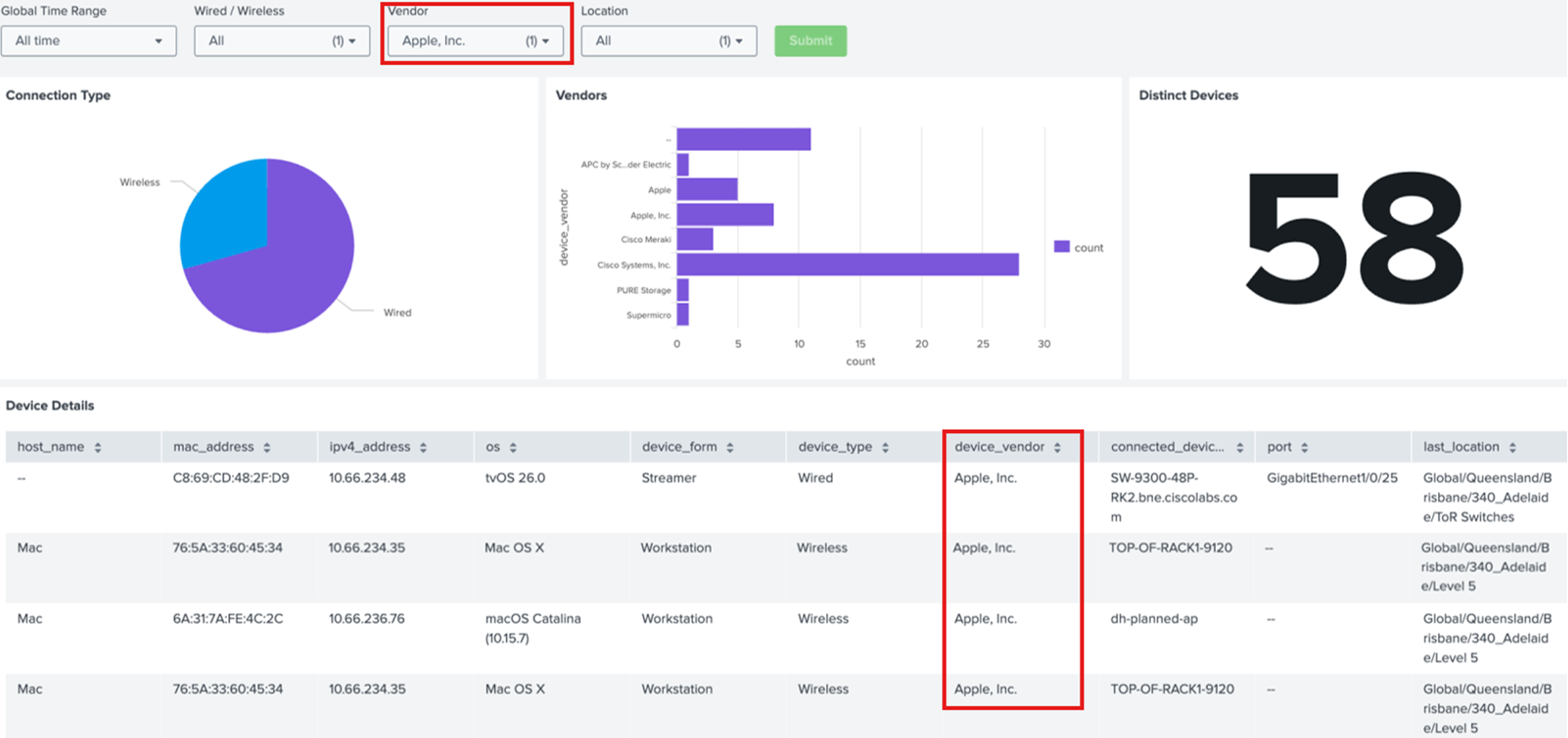
In the lab image below, we can see the overview of the data (we have used a lab example, so there's no real clinical data here).
This is an easy-to-use dashboard that’s taken data from an API and displayed it in an accessible format.
The data can now be filtered – we’ve put in a filter to view all Apple devices and the data below shows the specific detail on those.
This simple dashboard allows the clinical staff to:
- Easily Filter Device Types: Can be on MAC address for specific manufacturers, or where the device vendor has been identified on this field
- Where Connected: We can see the port that device is connected to and the location: track filter on the device you are looking for and see where it's connected to
- Wired or Wireless: Many BioMedical devices are wireless of course. Filtering on the device(s) you're looking for also shows us the last known location that device was in - even if it's a wireless device
- OS: All devices need to be upgraded periodically, and BioMedical devices are no different. In our solution below, we can simply filter all devices based on a specific operating system - find all the devices that need upgrading and see where they are to go and collect them and undertake the upgrade
BLOGS:
Splunk Next Steps
What are the next steps? Really that depends on what you want to extract from the data.
Adding some rules means we can extract data that meets those rules – this could be looking for suspicious devices for example:
- Tell me all the devices that have been connected via wired, but change port frequently
- Show me all the Wi-Fi devices that move between sites
- Examine if the same MAC address appears at the same time on two different switches
As for the visuals, Splunk has its Dashboard Studio to be able to generate ITSI Glass tables, such as the one shown below. This allows us to overlay our live data onto maps and other images, which makes this a really visually appealing option:
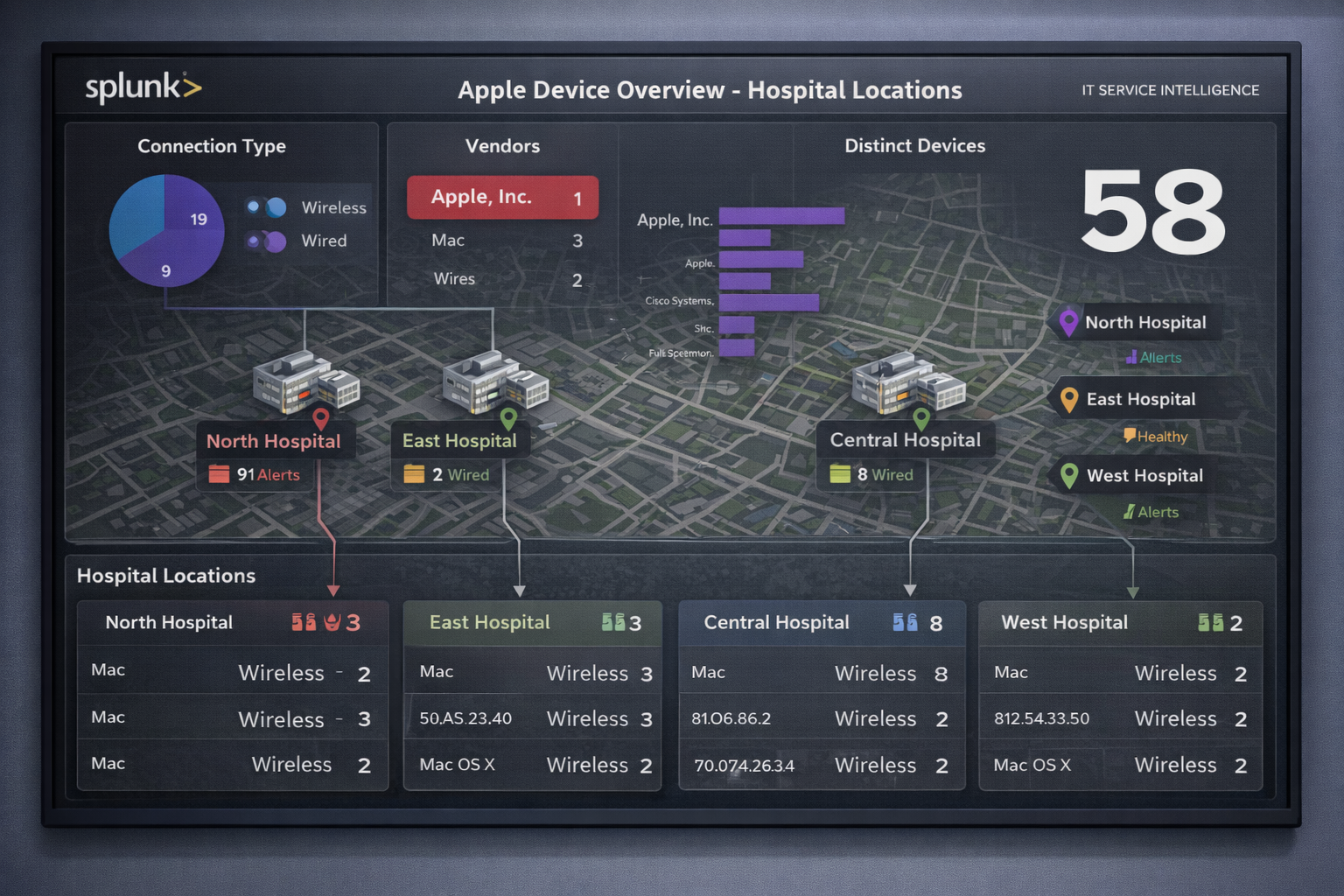
Sample Render of Splunk Glass Table View
BLOGS:
Splunk ITSI Healthcare Case Study: Summary
This blog has highlighted the unique intersection of factors in healthcare environments that make it difficult for staff to find and maintain a vast array of equipment.
Part of the solution is being able to locate devices when they're needed - and sometimes that has to be quickly. Occasionally a device gets lost, so knowing where it was last seen can be a major help in finding that device and returning it to service.
All clinical professionals are busy, so any help we can offer using IT Service Intelligence can help to make their lives a little easier.
If you’d like to chat over all things Splunk, or have any Splunk projects we could help you with, drop us a line at sales@iptel.com.au