.png?width=200&height=59&name=IPTellogo-byline-2020-dark-v2-pnd-optimised-500%20(1).png "IPTellogo-byline-2020-dark-v2-pnd-optimised-500 (1)")
Manufacturing has some very key things that need to be measured and predictive analysis of data is important. The key thing: do not stop the production line! If we can use data to help us make the site efficient and predict any issues with the network that might stop operations, we can provide a major cost saving to the business. Let's take a look!

- Produce dashboards that correlate data, and
- Search the data for useful insights and information
In this blog, we'll work through the manufacturing case study, looking at the users and the case studies, before moving onto some sample renders of dashboards.
Splunk in Manufacturing: End Users
That's not all though - data helps a manufacturer to really get to grips with how efficiently their processes work - all the while keeping an eye on the equipment running that process to ensure there are no issues.
.gif?width=215&height=215&name=Splunk%20(Instagram%20Post).gif) ICT Manager
ICT ManagerA SCADA network has to have the highest of uptimes and can sometimes lack visibility - making it very hard to fault find.
Splunk Use Cases in Manufacturing
The use cases in manufacturing are pretty unique to the space: heavy machinery, processes that require close monitoring and the ability to orchestrate across a factory floor are all requirements.
The most common use cases for Splunk in manufacturing are:
1. OT Monitoring & Predictive Maintenance
- Monitors machine, PLC, SCADA, and sensor data
- Detects abnormal behaviour and early failure indicators
- Reduces unplanned downtime and maintenance costs
Outcome: Improved asset uptime and OEE
2. Manufacturing Operations Visibility
- Provide real‑time dashboards across lines and plant
- Track KPIs like throughput, downtime, yield, and scrap
- Correlate IT, OT, MES, and ERP data
Outcome: Faster decisions and root‑cause analysis
.png?width=225&height=225&name=Splunk%20Healthcare%20Case%20Study%20(Instagram%20Post).png)
3. OT & ICT Monitoring
- Detect ICT failures that impact the operations flow
- Correlates IT and OT events
- Support incident response - conduct network fault finding more quickly
Outcome: Reduced time to return to service
4. Quality & Root Cause Analysis
- Links defects to machine conditions, batches, and processes
- Identifies patterns driving scrap and rework
Outcome: Higher product quality and lower waste
The use cases in manufacturing tend to be in two parts: ensure the operations don't stop - and see if we can spot anywhere to be more efficient.
In the next section we'll start to look at the interesting bit: how these use cases are displayed on a dashboard.
Splunk in Manufacturing: End-End View
The thing everyone wants is simple: understand what's going on - and when there's an issue have enough up to date information to see where the problem lies and quickly resolve it.
There are a couple of options in Splunk for how we show dashboards. In the IT Service Intelligence (ITSI) module, we have two options:
- Dashboard Studio: Excellent place to produce a wide range of dashboards for different users - that look good
- Glass Tables: These are a rendered image that might be more of an 'exec' level dashboard
.gif?width=211&height=211&name=Copy%20of%20Cisco%20AuHow%20Splunk%20Helps%20Businesses%20Discover%20Connected%20Devices%20(Instagram%20Post).gif) We'll explore both the dashboard options in this blog, however typically we will default to using the Dashboard Studio.
We'll explore both the dashboard options in this blog, however typically we will default to using the Dashboard Studio.
For our end-end view though, we'll explore that exec level dashboard. We can't show an actual customer dashboard, so in this blog we will illustrate the setup with some AI renders that look like the real thing.
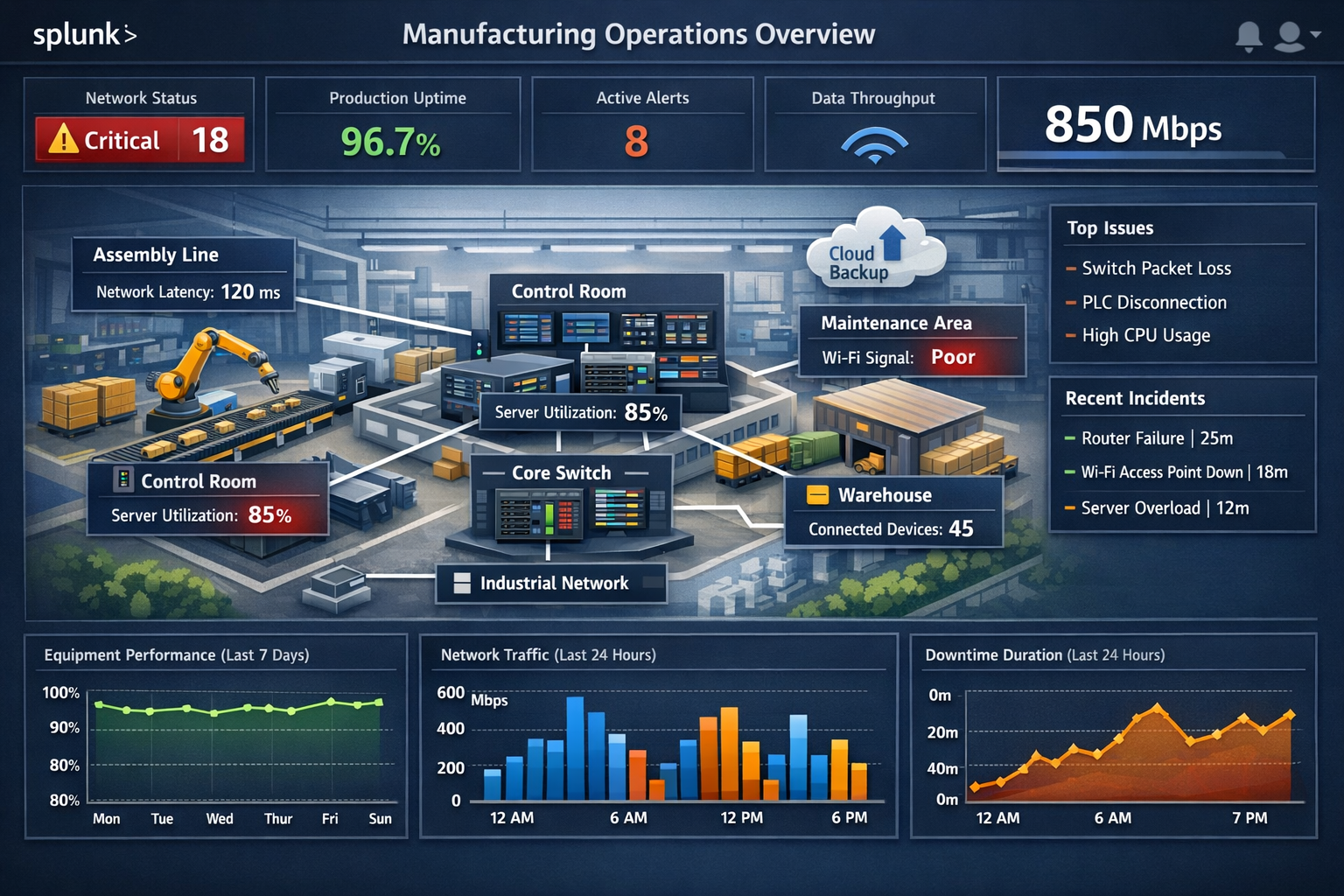
The image below is an ITSI Glass Table view and in this stylised view, we can see all the important end-end information for the plant. This might be the sort of view that the CEO would like at the front desk or in the board room.
In this Glass Table, we're showing various parameters important to the production, which is a culmination of a range of ingested data - all displayed in one place. That ability to take that range of data and correlate it really is the power that Splunk brings - you'll get end-end visibility in a way you can't otherwise:
Splunk Dashboard Studio
In the sections above, we mentioned there were two ways to show the data - Glass Tables and Dashboard Studio.
For most users, we want to produce the data they need in a quickly understandable way - and Dashboard Studio is perfect for producing these.
In the image below, we can see a sample dashboard:
- Alert Types: We can clearly see the quantity and type of alerts and how they're impacting the network
- Types of Equipment: Manufacturing uses a range - from standard networking equipment (albeit IoT versions) through to PLCs, sensors and cameras
- Major issues and Parameters: This is just a sample render below, but we would typically want the key metrics and KPIs shown on these dashboards
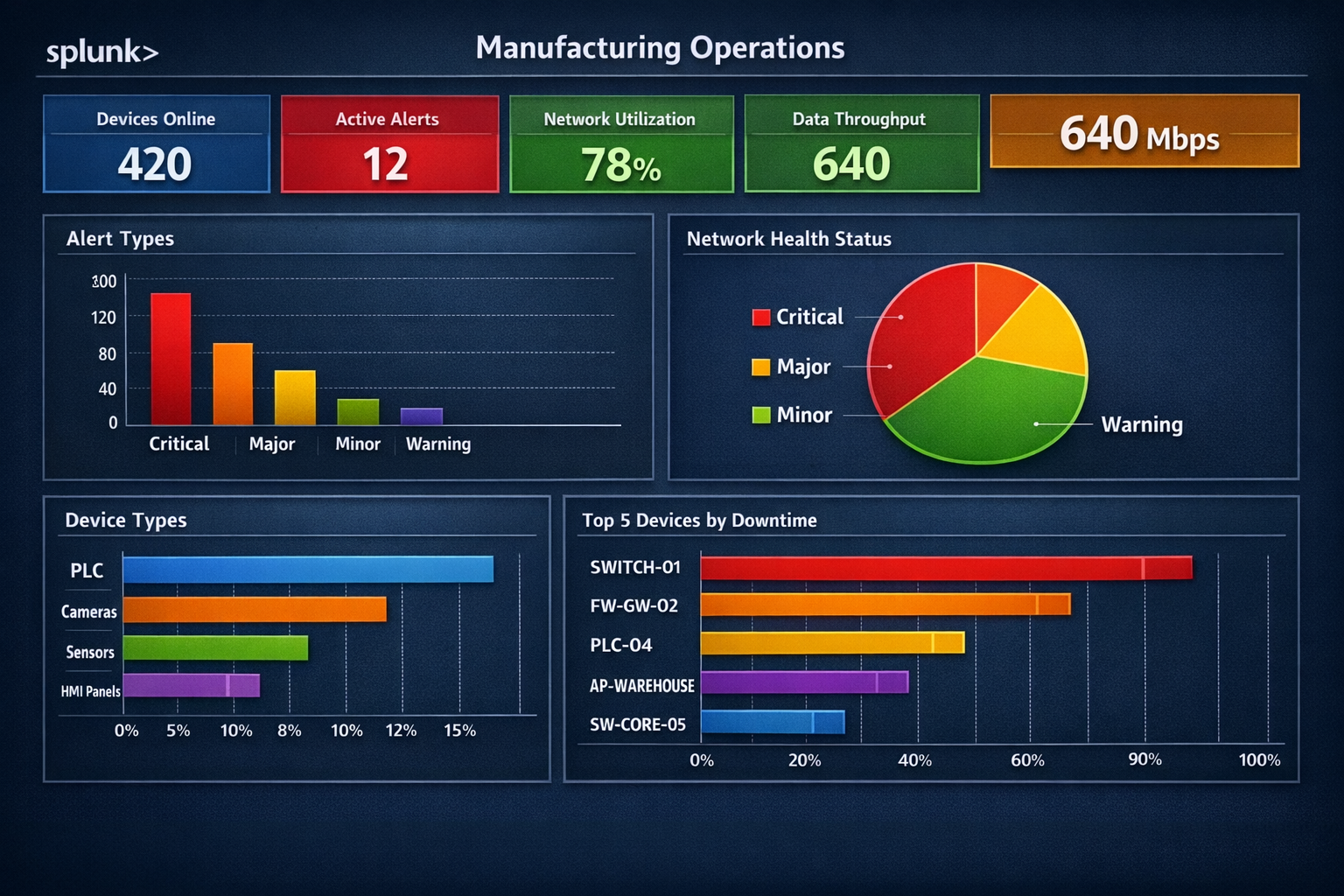
Sample Render of a Splunk Dashboard Studio dashboard
In our final sample render, we bring in the financial side: we can put rules on how much an outage costs, which really helps focus the mind of all operations staff.
This is also useful to senior management - if there are investment decisions to be made to improve reliability, it can easily be seen how much outages are costing and that can be used in a business case to drive investment:
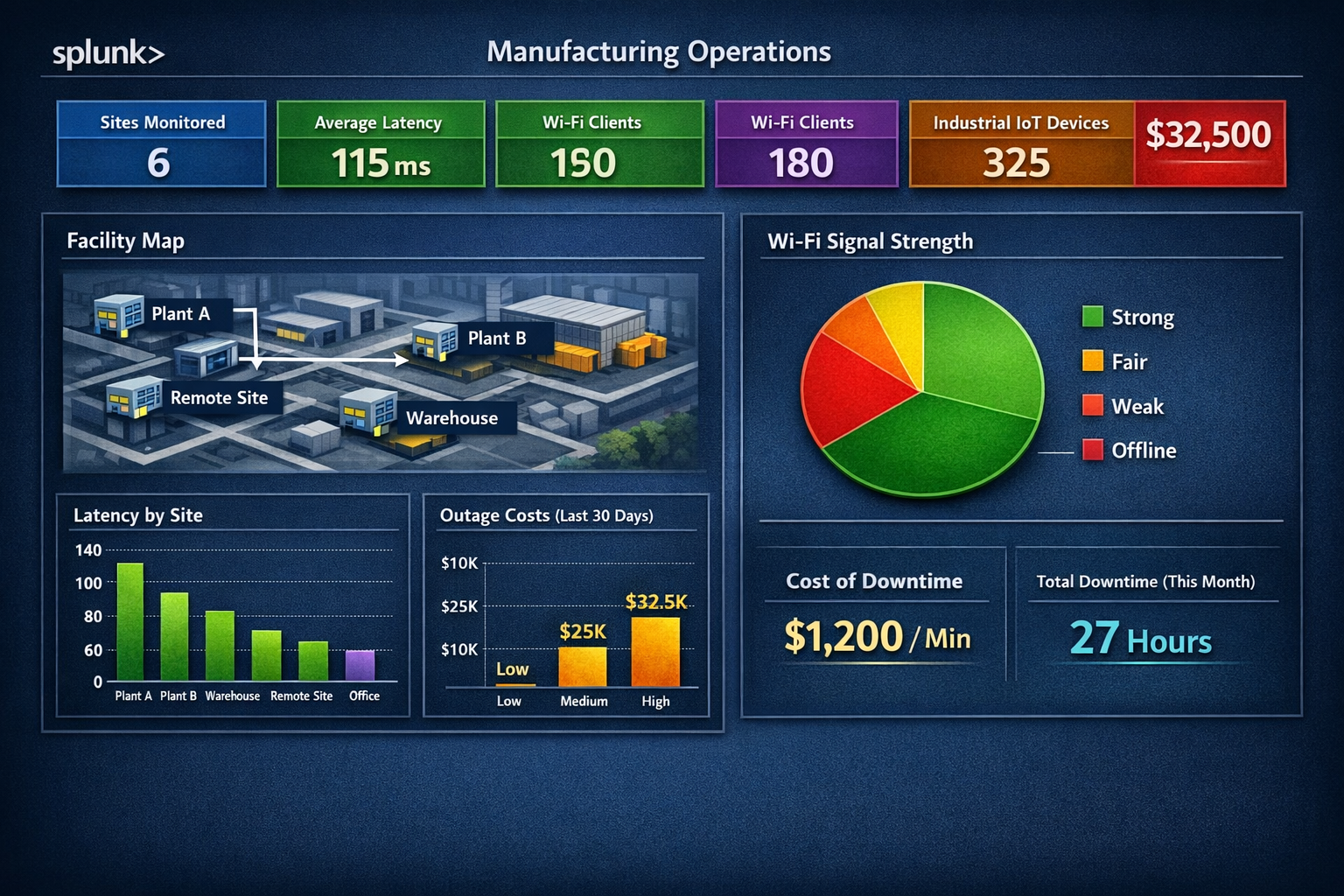
Sample Render of a Splunk Dashboard Studio dashboard
Once data is ingested, the dashboards can really be built according to those users and use cases - very specific for manufacturing.
Splunk Manufacturing Case Study: Summary
If you’d like to chat over all things Splunk, or have any Splunk projects we could help you with, drop us a line at sales@iptel.com.au.
Need Help With Splunk?
IPTel's Splunk team can help, or start with our free Splunk Assessment. If that would be useful, get in touch with the IPTel team or email sales@iptel.com.au.