.png?width=200&height=59&name=IPTellogo-byline-2020-dark-v2-pnd-optimised-500%20(1).png "IPTellogo-byline-2020-dark-v2-pnd-optimised-500 (1)")
As a CISO, you get asked the same question in a dozen different forms, by the board, the executive team, auditors and sometimes regulators: "Are our users secure?" It's a hard one to answer with confidence. Users work from the office, from home and from everywhere in between, on laptops, phones and tablets, as employees, contractors and visitors. The evidence you need sits across network, endpoint and identity tools, each owned by a different team. In this post we show how user activity monitoring with Splunk pulls that evidence into one organisation-wide view, so you can answer with data rather than reassurance.
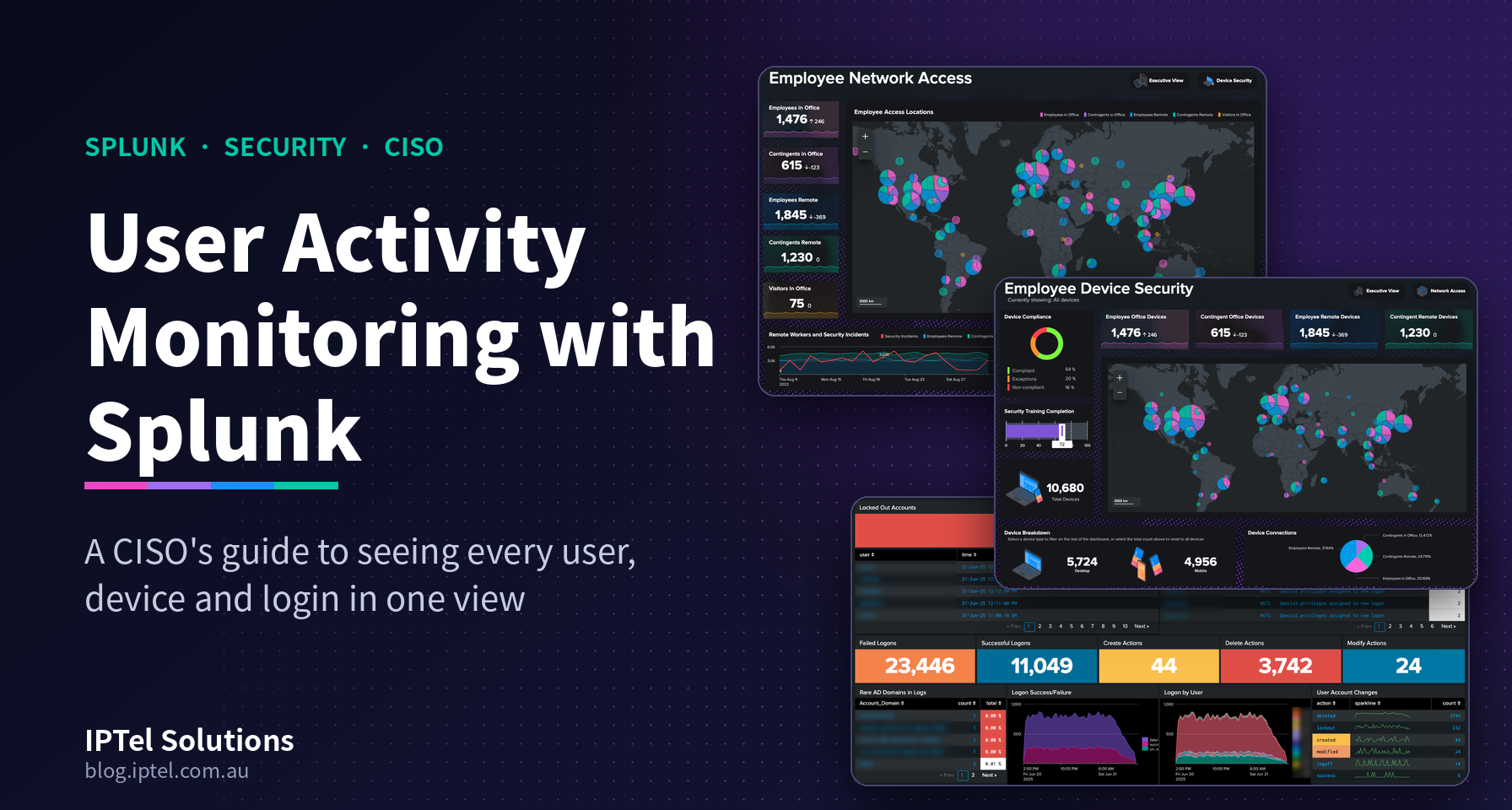
User Activity Monitoring: Why It's Hard for a CISO
User activity monitoring is the continuous tracking of how users connect to, authenticate with and behave across an organisation's systems. It covers network access, devices and account activity. It's hard for a CISO because that evidence is spread across separate tools and teams, with no shared timeline and no shared definition of "normal".
You'll probably recognise the symptoms. When the board asks about a headline breach, it takes days to confirm whether you're exposed. Contractors, remote users and unmanaged devices fall into the gaps between tools. And an audit only proves you were compliant on the day, not that you're compliant today.
What you actually need is one continuously updated view of end user risk across the organisation, and one you trust enough to put in front of the board.
What Is Splunk, and How Does It Help a CISO?
.gif?width=173&height=173&name=Splunk%20(Instagram%20Post).gif) Splunk is a data platform that collects machine data (logs, events and metrics) from almost any source, then lets you search, correlate and visualise it in one place. For a CISO, that means network access, device compliance and identity activity can be read together as one picture of end user risk.
Splunk is a data platform that collects machine data (logs, events and metrics) from almost any source, then lets you search, correlate and visualise it in one place. For a CISO, that means network access, device compliance and identity activity can be read together as one picture of end user risk.
Splunk has been part of Cisco since the acquisition in 2024. It sits naturally alongside the Cisco networking, identity and security platforms many Australian enterprises and government agencies already run. The dashboards below were built in Splunk Dashboard Studio using sample data. Each one answers a single question a CISO needs answered.
User Activity Monitoring: Three Dashboards, Three Questions
Every end user security question comes back to three things: who is connecting, what are they connecting with, and what is their account doing once they're in? We've built one dashboard for each.
Network Access: Who Is Connecting, and From Where?
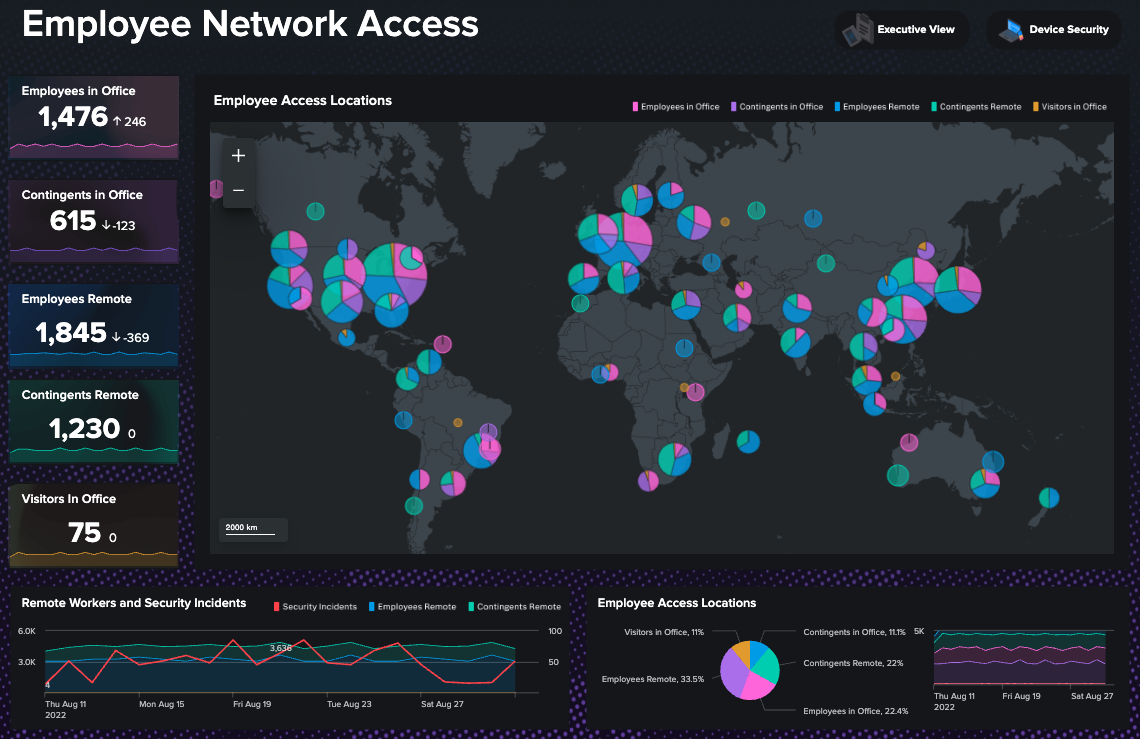
.gif?width=173&height=173&name=Cisco%20ISE%20(Instagram).gif) A network access dashboard shows who is connecting to your organisation, how, and from where. It splits the population into employees and contractors, in the office and remote, plus visitors. Each group has its own trend line, and every connection is plotted on a map, so a new country or an unexpected site stands out straight away.
A network access dashboard shows who is connecting to your organisation, how, and from where. It splits the population into employees and contractors, in the office and remote, plus visitors. Each group has its own trend line, and every connection is plotted on a map, so a new country or an unexpected site stands out straight away.
The panel that matters most at CISO level overlays security incidents on remote-worker volumes over time. It shows whether a rise in incidents tracks a change in how people are working, such as a surge in remote contractor sessions or a new access pattern. That's the kind of insight that shapes where policy and investment go next.
Device Security: Are Users on Compliant, Healthy Devices?
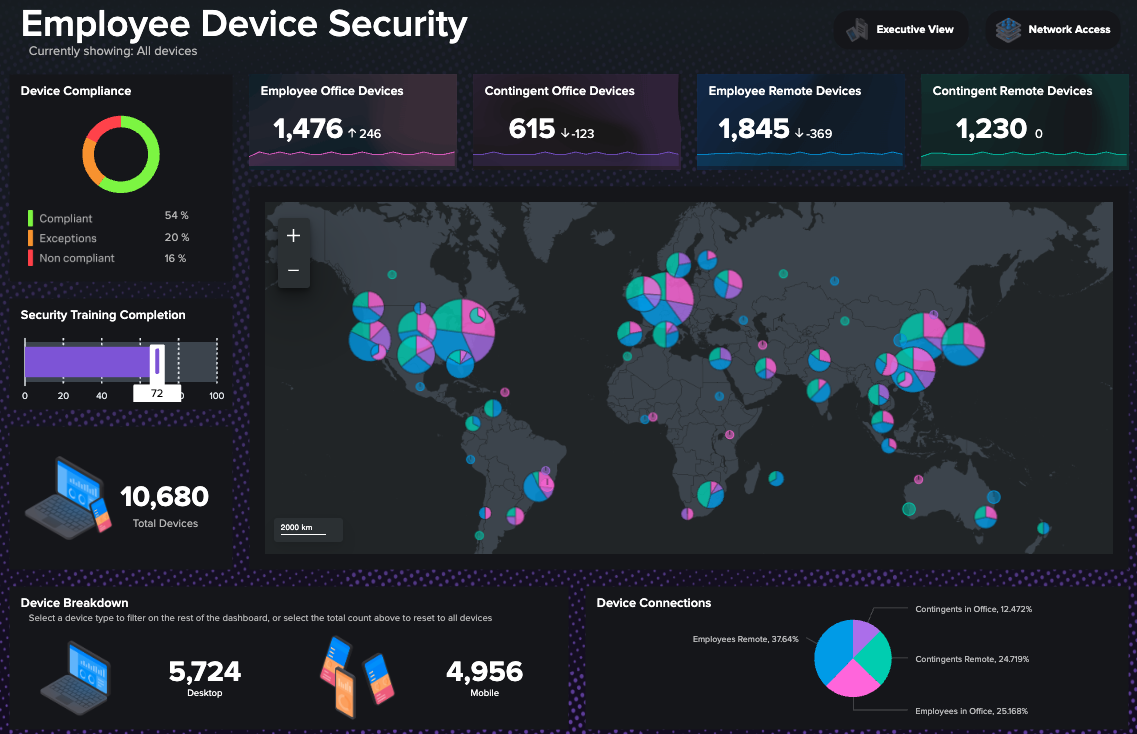
.gif?width=173&height=173&name=Copy%20of%20Cisco%20AuHow%20Splunk%20Helps%20Businesses%20Discover%20Connected%20Devices%20(Instagram%20Post).gif) A device security dashboard shows the compliance, health and distribution of every device connected to your organisation at a glance. For a CISO, it turns "we have an endpoint policy" into "here's how much of the fleet meets it today, and where the gaps are".
A device security dashboard shows the compliance, health and distribution of every device connected to your organisation at a glance. For a CISO, it turns "we have an endpoint policy" into "here's how much of the fleet meets it today, and where the gaps are".
The sample dashboard breaks the fleet into compliant devices, devices running under an exception, and non-compliant devices. It also shows security training completion (people are part of the attack surface too), the split between desktop and mobile, and where each device sits on the map. Select a device type and the whole dashboard filters to match.
Every compliance score opens a drilldown view. That means your team can go from "16% non-compliant" to which devices, which users and what's missing without raising a ticket. Scores can also roll up by business unit, site or region, which is handy when you report risk by division.
Pro-Tip: watch the exceptions as closely as the non-compliant devices. Exceptions granted for a good reason six months ago have a habit of outliving that reason. Give each one an owner and an expiry date, and put both on the dashboard.
Identity Monitoring: What Are User Accounts Actually Doing?
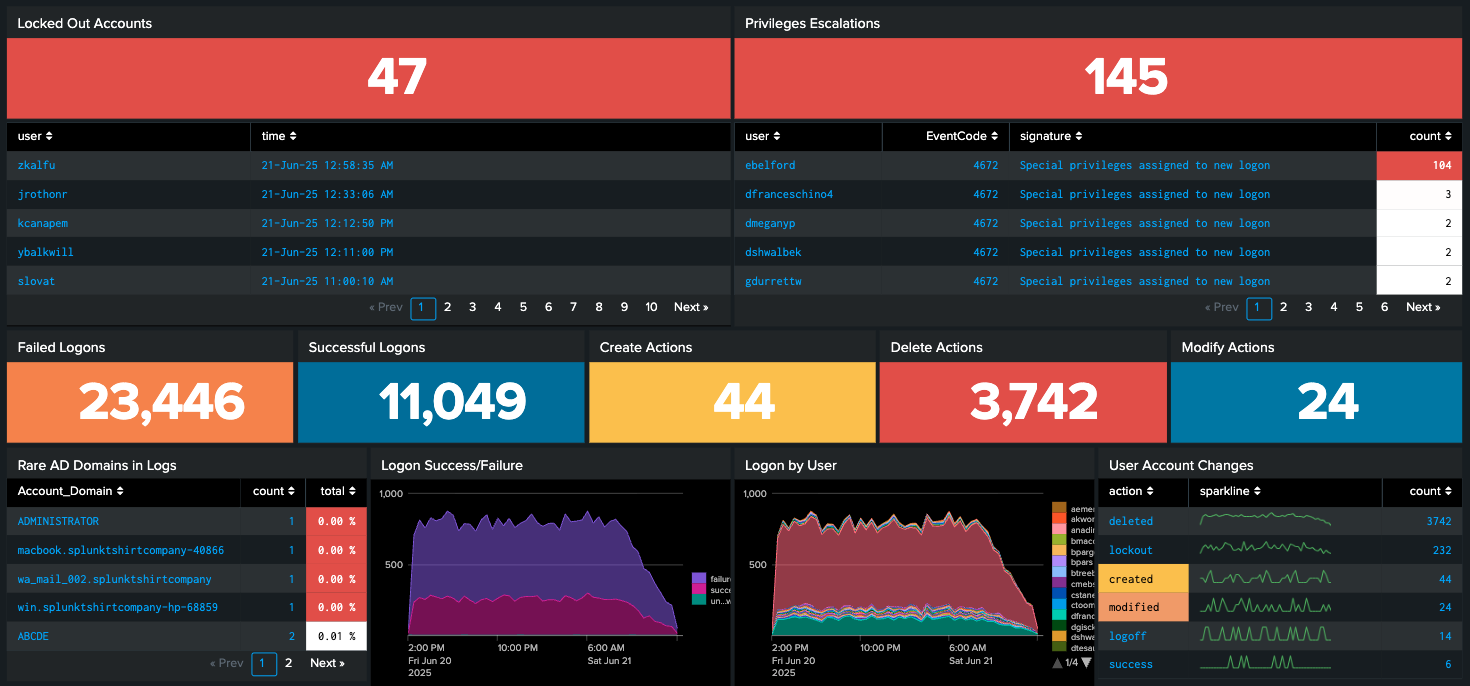
An identity monitoring dashboard shows how user accounts are behaving across your Windows and Active Directory (AD) environment. Compromised credentials and privilege misuse remain some of the most common ways attackers get in and move around, so this is where early warning matters most.
The sample dashboard is built entirely from standard Windows security events:
Locked-out accounts (Event ID 4740): often the first visible sign of password spraying.
Privilege escalations (Event ID 4672): special privileges assigned at logon, counted per user. One account sitting far above the rest deserves a question.
Failed vs successful logons (Event IDs 4625 and 4624): trended over time.
Account changes: accounts created, deleted, modified and locked out, each with a sparkline.
Rare AD domains: account domains that seldom appear in the logs, and often a sign of something that doesn't belong.
In the sample data, failed logons outnumber successful ones by about two to one. That doesn't automatically mean an attack. Stale credentials on a phone or a service account can produce exactly the same pattern. But it's exactly the kind of signal a CISO wants surfaced, baselined and explained, not buried in a log file.
User Activity Monitoring: One View of End User Risk
Each dashboard is useful on its own. For a CISO, the real value comes when all three sit on the same timeline.
Here's an illustrative example. A contractor account logs in from a location it has never used before. On its own, that could just be travel. The device dashboard shows the laptop has been running under an exception for weeks, with patching overdue. The identity dashboard shows the same account picking up privileges it doesn't normally use.
Three separate teams would each see one odd signal, and probably move on. Correlated in Splunk, it's clearly one incident, and your team can act in minutes rather than finding out days later.
That's where the peace of mind comes from. You'll still get alerts. What changes is that you can see how they connect, and trust that nothing is falling between the cracks.
How Does Splunk Support Board Reporting and Compliance?
.png?width=173&height=173&name=Security%20Assessment%20Tool%20(Instagram%20Post).png) Splunk supports board reporting and compliance by turning security controls into continuously measured evidence. Instead of a point-in-time audit, you can show the current state of patching, privileged access and user activity, trended over time and broken down by business unit.
Splunk supports board reporting and compliance by turning security controls into continuously measured evidence. Instead of a point-in-time audit, you can show the current state of patching, privileged access and user activity, trended over time and broken down by business unit.
For Australian organisations, that maps neatly onto the Essential Eight. Patching applications and operating systems, restricting administrative privileges and multi-factor authentication can all be evidenced straight from device and identity data. Critical infrastructure operators under the SOCI (Security of Critical Infrastructure) Act get something just as useful: a risk management program they can demonstrate, not just document.
And for the boardroom itself, an Executive View summarises risk posture in terms directors understand, with the detail one click away if they ask.
What Does a Splunk Expert Do for a CISO?
A Splunk expert designs the data behind the dashboards: which sources to collect, how to normalise them, and which questions each view answers. The result is reliable insight for the CISO rather than noise or runaway licence costs. The dashboards are what you see. The data design underneath is what makes them trustworthy.
In practice, that starts with bringing in the right sources, such as Windows events, network access control, wireless, VPN, and endpoint and device management, without paying to ingest data nobody uses. Those sources are then mapped to common fields so users, devices and accounts can be correlated. Baselines are set for each user group, site and time of day, so an alert actually means something. From there it's about building views for the people who use them: an executive summary for you and the board, and drilldowns for your analysts and engineers. We've taken the same approach in healthcare, manufacturing and telecommunications.
Here at IPTel, we come at Splunk from the network side. Most of the data behind end user security (wireless, switching, access control and identity) flows through infrastructure we design and support every day. Our Splunk services cover licensing, implementation and ongoing managed services.
User Activity Monitoring with Splunk: FAQs
What is user activity monitoring?
User activity monitoring is the continuous tracking of how users connect to, authenticate with and behave across an organisation's systems. It combines network access, device compliance and account activity. That lets security teams spot risky or unusual behaviour early and show evidence that controls are working.
Can Splunk give a CISO a single view of end user security?
Yes. Splunk ingests network access, device compliance and identity data, then correlates them in dashboards that show end user risk across the whole organisation. That covers employees, contractors and visitors, whether on site or remote.
What data sources should a CISO prioritise in Splunk?
Start with identity (Windows and AD security events), network access control and VPN, and endpoint or device management. Together, those cover who is connecting, from what, and what their accounts are doing.
Which Windows events matter most for monitoring user activity?
A good starting set is 4624 (successful logon), 4625 (failed logon), 4740 (account locked out) and 4672 (special privileges assigned to a new logon). Add account creation, deletion and modification events from there.
Can Splunk help with Essential Eight reporting?
Yes. Splunk can evidence several Essential Eight controls, including patching, restricting administrative privileges and multi-factor authentication, by trending device and identity data over time.
Does Splunk work with Cisco security and networking?
Yes. Splunk is part of Cisco and ingests telemetry from Cisco wireless, switching, identity and security platforms, including Cisco XDR. That makes it a natural fit for Cisco-based environments.
Do we need a Splunk partner, or can we do it in-house?
Many organisations run Splunk in-house. A Splunk partner helps most with the initial data design and correlation, and with keeping ingestion (and licence cost) under control as the environment grows.
User Activity Monitoring with Splunk: Summary
A CISO needs to answer three questions with confidence: who is connecting, from what device, and what is their account doing? User activity monitoring with Splunk brings the answers into one organisation-wide view, with network access, device security and identity dashboards sitting on a single timeline and backed by continuous evidence rather than point-in-time audits. That's what gives you peace of mind, and a clear, defensible answer when the board asks whether your users are secure.
Need Help With User Activity Monitoring?
Not sure where to start? Our Splunk Assessment and Security Assessment give your organisation a clear health check on end user, device and identity visibility. If you're looking for a Splunk expert who understands both the data and the network it comes from, get in touch via our contact page or email sales@iptel.com.au.