.png?width=200&height=59&name=IPTellogo-byline-2020-dark-v2-pnd-optimised-500%20(1).png "IPTellogo-byline-2020-dark-v2-pnd-optimised-500 (1)")
Conference season has been and gone, and between Cisco Live US and InfoComm 2026 there was plenty of noise about the "agentic workplace". Strip the marketing back, though, and a genuinely useful pattern emerges. The meeting room is getting easier to run, and fairer for the people dialling in.
Here's what caught our attention, and what it means if you look after a fleet of rooms.
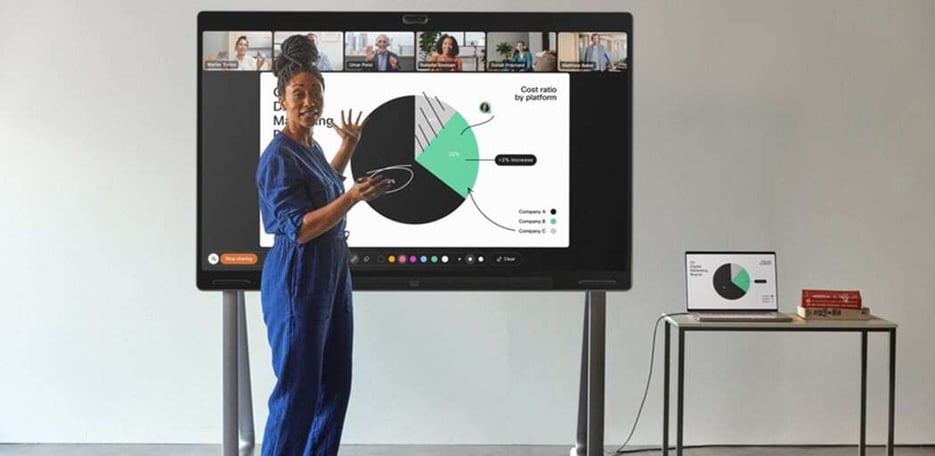
Board Pro G3: One Board, Managed Your Way
Cisco introduced the Board Pro G3 at Cisco Live US in June. It's more than a spec bump.
The headline change is under the bonnet: an NVIDIA AI chipset handling image, audio and language processing on the device itself. In practice this means whiteboarding, annotation and web apps feel fast rather than laggy, which is the difference between a board people reach for and one that gathers dust. There are two active pens with buttons for low-latency, multi-ink annotation, plus a 4K screen with a dual-camera system (a wide lens and a telephoto) to frame the room.
The more important detail for IT is quieter. The Board Pro G3 is Cisco's first Microsoft Teams Rooms (MTR) certified board built on the Microsoft Device Ecosystem Platform (MDEP). If you run Teams Rooms, you manage this board the same way you manage the rest of your Teams estate, with no separate world for the Cisco hardware.
And at InfoComm, Cisco pulled the four MTR release channels (Microsoft Approved, Verification, Trial, and Approval Candidate) into Control Hub as first-class channels. If you've ever juggled MTR builds across separate tools, this is the single pane of glass you actually wanted.
ASSOCIATED BLOGS:
Hybrid Equity: Cameras That Follow the Conversation
Ask any remote attendee for their number one complaint and it's the same: "I can't tell who's talking." In a large room, a single camera at the front can't fix that..gif?width=240&height=240&name=Meeting%20Rooms%20as%20a%20Service%20(Instagram%20Post).gif)
This is where Cisco's multi-camera work matters. Cross-view uses two side cameras (Room Vision PTZ or PTZ 4K) alongside a main camera above the screen, and the codec decides, in real time, which angle best captures whoever's speaking, based on both what it sees and where the microphones place the voice. Extended Speaker View does the same job down a long boardroom table, giving clean close-ups of people at the far end instead of distant specks.
The Room Vision PTZ is the pick for larger rooms. It's a silent, motorised camera with optical zoom, so it physically moves and zooms rather than digitally cropping, which holds image quality as it tracks.
One detail worth calling out: all of this switching intelligence runs locally on the codec. It isn't tied to Webex. The same tracking works across Webex, Microsoft Teams Rooms, Zoom and BYOD.
Pro-Tip: Multi-camera rooms live or die on microphone placement and room prep. The switching uses the mics to locate the speaker, so a Ceiling or Table Microphone Pro isn't optional, and table size, seating and lighting all affect the result. Plan the room, don't just hang the cameras.
ASSOCIATED BLOGS:
Platform Choice: Zoom Rooms, Natively, on Cisco Hardware
Here's a dilemma we hear constantly. An organisation standardises on Zoom, then falls for Cisco hardware, and feels forced to choose.
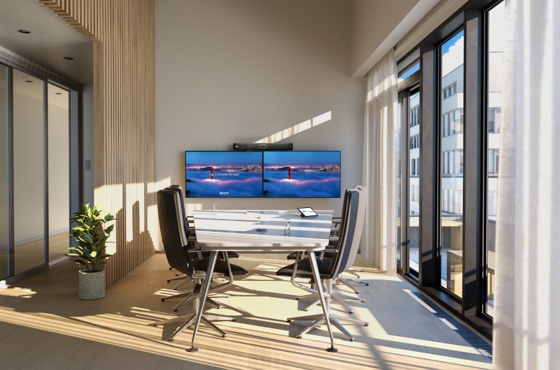
At InfoComm, Cisco moved to close that gap by seeking Zoom Rooms certification across its range: Desk Pro G2 for desks and huddle spaces, Room Bar (or Bar Pro) for everyday rooms, Board Pro G3 for ideation, and Room Kit Pro G2 for large rooms and auditoriums. On a certified device, you walk in to the familiar Zoom Rooms home screen, with Zoom as the primary experience rather than an interop bridge.
What you keep, because it's built into the Cisco hardware and RoomOS, is the operational layer:
-
Agentic Director: on-device camera intelligence that frames people automatically, across multiple cameras, with no mode-switching from the user.
-
Control Hub: workspace-level visibility and telemetry alongside Zoom's own device management, so a mixed fleet stays manageable at scale.
-
ThousandEyes in the room: hop-by-hop visibility of the network path from the device itself. When someone reports a poor call on Tuesday morning, you can see whether it was the network. You're not guessing.
Public beta opened in June 2026, with general availability expected in September. It's worth noting this sits alongside the existing "Zoom for Cisco Rooms" option. The new piece is a certified, Zoom-first experience.
ASSOCIATED BLOGS:
Deployment at Scale: Zero Touch Provisioning
If you've ever rolled out rooms across multiple sites, you know the pain of the 16-digit activation code, with someone balanced on a chair, squinting at a screen, reading numbers down the phone.
From the RoomOS 26.5 image, that goes away. You pre-register a device in Control Hub against its wired ethernet MAC address, ship it to site, and it registers itself when it's plugged in. No code, and no truck roll for a login.
For a multi-site rollout, that's the difference between flying an engineer around the country and shipping boxes. Fewer errors, fewer go-live support calls, less travel.
Pro-Tip: ZTP arrived with the 26.5 image but wasn't fully GA across every distribution channel at launch. If you're planning a large rollout on it, confirm your devices are on 26.5.0 or later and that the channel you're pulling from is ready.
ASSOCIATED BLOG:
The Meeting Room: Summary
The through-line across both shows isn't a single product. It's that the meeting room is becoming less of an operational burden. One device that runs Webex, Teams, Zoom or Google Meet. One management plane for a mixed fleet. Cameras that give remote people a fair seat. And deployment that doesn't need a person on site to type in a code.
For anyone running a meeting rooms, that's the number that matters: less time keeping rooms operational, and fewer rooms people quietly avoid.
ASSOCIATED BLOG:
Need a Hand With Your Rooms?
Meeting rooms are what we do, from a single boardroom refresh to a national, multi-site rollout. If you'd like to talk through what this means for your environment, or you want a clear health check on your current rooms, get in touch with the IPTel team.